How to Register a Domain Name for Your Website Step by Step | 2026 Guide | Host Serve
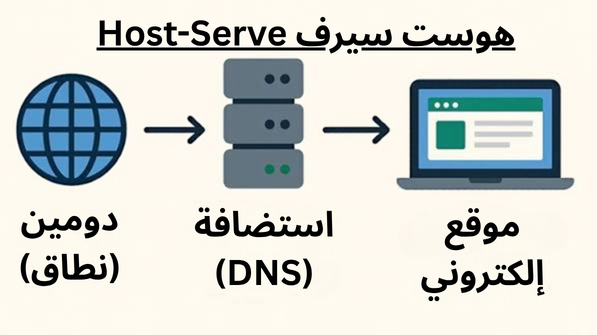
How to Register a Domain Name for Your Website Step by Step: From Searching for a Name to Verifying Ownership and Connecting to Hosting
Every website starts with a name. That name, the domain, is what visitors type into their browser to reach you. And although registering a domain can look like a simple process that ends with a “buy” click, there are steps that separate people who register their domain properly from those who lose it or get stuck because of a small mistake: wrong owner details, a verification email that was never opened, or a domain left unrenewed.
In this guide, we explain how to register a domain name for your website step by step: from searching for the name, to entering the right details, to verifying ownership, to connecting it to hosting and protecting it from being lost. We also show how the process works with Host Serve.
What Does Registering a Domain Actually Mean?
When you “buy” a domain, you’re really registering it for a set period (usually a year or more), and you must renew it to keep it. The process goes through a company called a registrar, which deals with the body that manages the extension. After registering, you’re the registered owner of the domain, and you can point it to any hosting.
The Parts of a Domain Name
In the address www.example.com:
- example: the domain name you choose.
- .com: the extension (TLD).
- www: a common subdomain.
Before You Start: Get These Ready
- Real, complete details: your full name, address, phone number and email.
- An email you own and always check: an important verification message will reach it (explained below).
- Two or three backup names: your first choice may be taken.
- A renewal budget: know the renewal price, not just the first-year price.
- A clear idea of your site: to decide whether to register the domain with hosting or separately.
For choosing a good domain name and why registering domain and hosting together is often preferred, read domain registration and web hosting in Egypt. For the difference between domain and hosting, read what’s the difference between a domain and hosting?
The Practical Steps to Register a Domain
Step 1: Choose Your Domain Name
Keep it short, easy to say and type, and reflective of your business. Avoid numbers and too many hyphens, and make sure it doesn’t clash with another company’s trademark.
Step 2: Search for Availability
Type the name into the domain search tool at your registrar or hosting company. If it’s taken, you’ll see alternatives or other extensions. At Host Serve, you’ll find the domain search box on the homepage.
Step 3: Choose the Extension
.com is the most popular and the best fit for most projects. If you’re targeting a local audience, a country-specific extension may suit you, but some local extensions require special documents or conditions for registration, so check before you register.
Step 4: Choose Where to Register
You have two options:
- From a hosting company that offers domains: one management area and easier linking, and often a free domain with annual plans.
- From an independent registrar: more flexibility in keeping the domain separate from hosting.
Choose based on your needs, and check the renewal price and the transfer policy.
Step 5: Enter the Owner Details Accurately
This is the most important and most neglected step. Make sure that:
- The name is yours (or your company’s real name), not the name of the developer or agency building the site, so you don’t lose ownership.
- The email is real and one you own and check regularly.
- The phone number and address are correct.
Why? Because the registered owner’s details prove your ownership, and wrong details put the domain at risk of suspension.
Step 6: Decide About Privacy Protection
The domain owner’s details may be visible in public records. Some companies offer WHOIS privacy protection to hide them. Ask the provider you’re registering with whether it’s available, what it costs and whether it’s included.
Step 7: Choose the Registration Period and Complete Payment
You can register for a year or longer. A longer period lowers the risk of forgetting to renew, but review the price terms. After payment, you’ll receive confirmation messages in your inbox.
Step 8: Verify Your Email (Don’t Skip This)
After registering a new domain, you must click the verification link sent to your email within 15 calendar days of registration. If you don’t verify within that period, the domain is suspended and its DNS is changed. Registrar sources note the message can sometimes land in your spam folder, so check it, and the rule applies to new registrations, domain transfers and changes to the owner’s email. Whois verification process +2
Note: This rule applies to generic extensions (gTLDs) such as .com, and conditions may differ for local extensions. Ask your provider for details.Step 9: Connect the Domain to Your Hosting
A domain alone doesn’t display a website. You need to point it to your hosting in one of two ways:
- Change the nameservers to the hosting’s nameservers.
- Or set DNS records (such as an A record) to the hosting’s address.
If the domain and hosting are with the same company, linking is often automatic. After linking, DNS propagation takes time, from minutes to hours, and sometimes up to 24 hours or more. To understand what happens behind the scenes, read the visitor’s journey from typing the domain to the page appearing.
Step 10: Enable an SSL Certificate
Once the domain works, make sure your site opens on https. Host Serve provides free SSL certificates (Let’s Encrypt) that activate automatically, as the company states.
Step 11: Protect the Domain from Being Lost
- Turn on auto-renewal if available, and make sure your payment method is valid.
- Note the expiry date in your calendar with a reminder a month before.
- Enable the transfer lock if available, to prevent the domain being moved without your knowledge.
- Secure the registration account: a strong password and two-step verification if available.
- Keep your login details somewhere safe.
How Do You Register Your Domain with Host Serve?
According to what’s advertised on the company’s website at the time of writing:
- You’ll find a domain search tool on the homepage.
- You get a free domain with shared hosting plans when you choose the annual plan.
- Reseller and master reseller plans include free domains, and some include a domain reseller account.
- Free SSL, free website migration and 24/7 Arabic support.
The Steps
- Search for your domain name from the homepage.
- Choose the right hosting plan, preferably the annual plan to get the free domain.
- Create your account and complete the order with correct details.
- Check your email for the verification message.
- Install your site, for example WordPress, using the WordPress installation guide.
Ask technical support before buying about: which extensions the free domain covers, its duration, its renewal price, privacy protection, and whether you can register a domain without hosting. These details aren’t published in full on the site. For more on the free domain with hosting, read best hosting with a free domain and free SSL.
Host Serve Web Hosting Plans
Prices are as listed on the company’s website at the time of writing and may change with promotions.
PlanMonthly Price (First Year)WebsitesStorageRenews Yearly AtStarter$2.501 website5 GB NVMe$59.88Business ★ Most Popular$3.253 websites20 GB NVMe$79.97Professional$5.19Unlimited50 GB NVMe$139.00
All plans include unlimited bandwidth, free SSL, free website migration and a free domain with the annual plan.
Note: The monthly price shown is the annual plan price after discount, and the subscription renews at the rate in the renewal column. For the full cost, read how much does web hosting cost in Egypt?
Post-Registration Checklist
ItemDone?Name, email and phone are registered in my name and correct☐I clicked the verification link in my email☐I saved the registration account login details☐I connected the domain to hosting (nameservers or DNS)☐The site opens on https☐I enabled auto-renewal or set a reminder☐I enabled the transfer lock and account protection if available☐I know the renewal price and expiry date☐
Common Mistakes When Registering a Domain
- Registering the domain in the developer’s or agency’s name instead of yours.
- Using a wrong email, or one you don’t own, so the verification message never reaches you.
- Ignoring the verification message, and the site goes down.
- Forgetting to renew, and the name is lost.
- Choosing a long or confusing name.
- Connecting the domain to hosting and rushing to test before DNS propagation finishes.
- Not knowing the renewal price.
Frequently Asked Questions
How do I register a domain for my website?
Search for the name, choose the extension, enter correct owner details, complete payment, verify your email, then connect the domain to hosting.
How long does registration take?
Registration usually completes within minutes, but the site appearing after linking can take from minutes to hours because of DNS propagation.
What’s the verification message I get after registering?
It asks you to confirm your email as the domain owner. You need to click its link within the stated period (15 days for generic extensions) or the domain is suspended.
Is the free domain with hosting really mine?
Ask support before buying, and make sure the domain is registered in your name and that you can manage and transfer it under the terms.
What if I forget to renew my domain?
The site may go down, grace-period policies differ between providers, and the name may be lost. So enable auto-renewal and set a reminder.
Can I register a domain without hosting?
It depends on the provider. Host Serve’s published pages don’t mention selling a domain on its own, so ask technical support.
Can I connect a domain from another company to Host Serve?
Usually any domain can be connected to any hosting by setting the nameservers or DNS records. Confirm the steps with technical support.
How much does the hosting cost?
It starts from $2.50 per month for the first year on the annual plan, then renews at each plan’s listed price.
Conclusion
How to register a domain name for your website isn’t just about buying. Choose the name, enter correct owner details in your own name, verify your email within the stated period, connect the domain to hosting, and protect it with auto-renewal and a reminder. Host Serve offers a free domain with the annual plan, free SSL, free migration and 24/7 Arabic support, with plans starting from $2.50 per month.
Get started:
Contact: WhatsApp +201557521635 | Phone +201113541635 | support@host-serve.com
Related Posts


💬 Comments
No comments yet — be the first to comment!